6. Network Policies
Network Policies
One CNI function is the ability to enforce network policies and implement an in-cluster zero-trust container strategy. Network policies are a default Kubernetes object for controlling network traffic, but a CNI such as Cilium is required to enforce them. We will demonstrate traffic blocking with our simple app.
Note
If you are not yet familiar with Kubernetes Network Policies we suggest going to the Kubernetes DocumentationTask 6.1: Cilium Endpoints and Identities
Each Pod from our simple application is represented in Cilium as an Endpoint
. We can use the cilium tool inside a Cilium Pod to list them.
First get all Cilium pods with:
kubectl -n kube-system get pods -l k8s-app=cilium
NAME           READY     STATUS    RESTARTS   AGE
cilium-ksr7h   1/1       Running   0          13m16
and then run:
kubectl -n kube-system exec <podname> -- cilium endpoint list
Note
Or we just execute the first Pod of the DaemonSet:
kubectl -n kube-system exec ds/cilium -- cilium endpoint list
Cilium will match these endpoints with labels and generate identities as a result. The identity is what is used to enforce basic connectivity between endpoints. We can see this change of identity:
kubectl run test-identity --image=nginx
sleep 5 # just wait for the pod to get ready
kubectl -n kube-system exec daemonset/cilium -- cilium endpoint list | grep -E -B4 -A1  'IDENTITY|run'
kubectl label pod test-identity this=that
sleep 5 # give some time to process
kubectl -n kube-system exec daemonset/cilium -- cilium endpoint list | grep -E -B4 -A1  'IDENTITY|run'
kubectl delete pod test-identity
We see that the number for this Pod in the column IDENTITY has changed after we added another label. If you run endpoint list right after pod-labeling you might also see waiting-for-identity as the status of the endpoint.
Task 6.2: Verify connectivity
Make sure your FRONTEND and NOT_FRONTEND environment variable are still set. Otherwise set them again:
FRONTEND=$(kubectl get pods -l app=frontend -o jsonpath='{.items[0].metadata.name}')
echo ${FRONTEND}
NOT_FRONTEND=$(kubectl get pods -l app=not-frontend -o jsonpath='{.items[0].metadata.name}')
echo ${NOT_FRONTEND}
Now we generate some traffic as a baseline test.
kubectl exec -ti ${FRONTEND} -- curl -I --connect-timeout 5 backend:8080
and
kubectl exec -ti ${NOT_FRONTEND} -- curl -I --connect-timeout 5 backend:8080
This will execute a simple curl call from the frontend and not-frondend application to the backend application:
# Frontend
HTTP/1.1 200 OK
X-Powered-By: Express
Vary: Origin, Accept-Encoding
Access-Control-Allow-Credentials: true
Accept-Ranges: bytes
Cache-Control: public, max-age=0
Last-Modified: Sat, 26 Oct 1985 08:15:00 GMT
ETag: W/"83d-7438674ba0"
Content-Type: text/html; charset=UTF-8
Content-Length: 2109
Date: Tue, 23 Nov 2021 12:50:44 GMT
Connection: keep-alive

# Not Frontend
HTTP/1.1 200 OK
X-Powered-By: Express
Vary: Origin, Accept-Encoding
Access-Control-Allow-Credentials: true
Accept-Ranges: bytes
Cache-Control: public, max-age=0
Last-Modified: Sat, 26 Oct 1985 08:15:00 GMT
ETag: W/"83d-7438674ba0"
Content-Type: text/html; charset=UTF-8
Content-Length: 2109
Date: Tue, 23 Nov 2021 12:50:44 GMT
Connection: keep-alive
and we see, both applications can connect to the backend application.
Until now ingress and egress policy enforcement are still disabled on all of our pods because no network policy has been imported yet selecting any of the pods. Let us change this.
Task 6.3: Deny traffic with a Network Policy
We block traffic by applying a network policy. Create a file backend-ingress-deny.yaml with the following content:
---
kind: NetworkPolicy
apiVersion: networking.k8s.io/v1
metadata:
  name: backend-ingress-deny
spec:
  podSelector:
    matchLabels:
      app: backend
  policyTypes:
  - Ingress
The policy will deny all ingress traffic as it is of type Ingress but specifies no allow rule, and will be applied to all pods with the app=backend label thanks to the podSelector.
Ok, then let’s create the policy with:
kubectl apply -f backend-ingress-deny.yaml
and you can verify the created NetworkPolicy with:
kubectl get netpol
which gives you an output similar to this:
NAME                   POD-SELECTOR   AGE
backend-ingress-deny   app=backend    2s
Task 6.4: Verify connectivity again
We can now execute the connectivity check again:
kubectl exec -ti ${FRONTEND} -- curl -I --connect-timeout 5 backend:8080
and
kubectl exec -ti ${NOT_FRONTEND} -- curl -I --connect-timeout 5 backend:8080
but this time you see that the frontend and not-frontend application cannot connect anymore to the backend:
# Frontend
curl: (28) Connection timed out after 5001 milliseconds
command terminated with exit code 28
# Not Frontend
curl: (28) Connection timed out after 5001 milliseconds
command terminated with exit code 28
The network policy correctly switched the default ingress behavior from default allow to default deny. We can also check this in Grafana.
Note
Note: our earlier Grafana port-forward should still be running (can be checked by running jobs or ps aux | grep "grafana"). If it does not open the URL from the command output below (or http://localhost:3000/dashboards with a local setup).
kubectl -n cilium-monitoring port-forward service/grafana --address 0.0.0.0 --address :: 3000:3000 &
echo "http://$(curl -s ifconfig.me):3000/dashboards"
In Grafana browse to the dashboard Hubble. You should see now data in more graphs. Check the graphs Drop Reason, Forwarded vs Dropped. In Top 10 Source Pods with Denied Packets you should find the name of the pods from our simple application.
Let’s now selectively re-allow traffic again, but only from frontend to backend.
Task 6.5: Allow traffic from frontend to backend
We can do it by crafting a new network policy manually, but we can also use the Network Policy Editor to help us out:
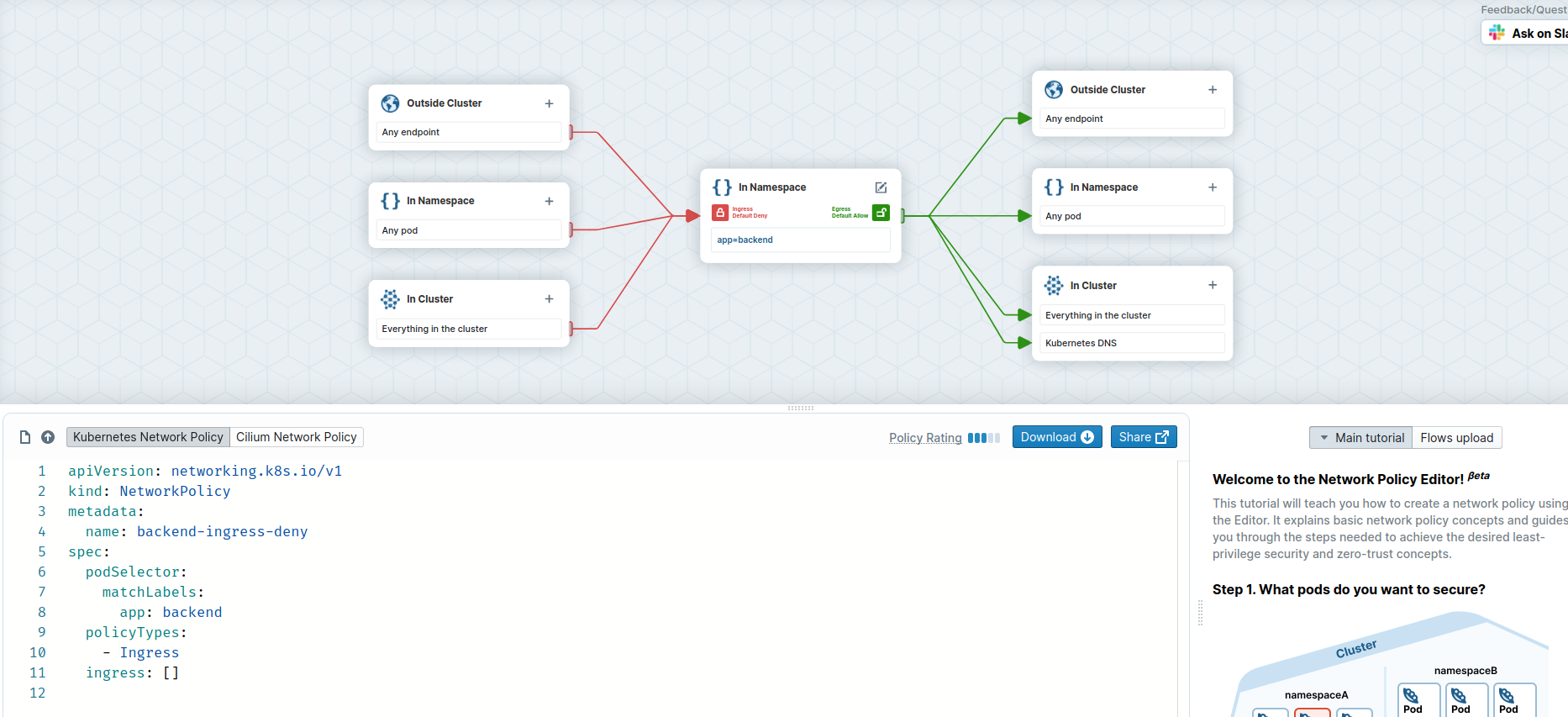
Above you see our original policy, we create an new one with the editor now.
- Go to https://networkpolicy.io/editor .
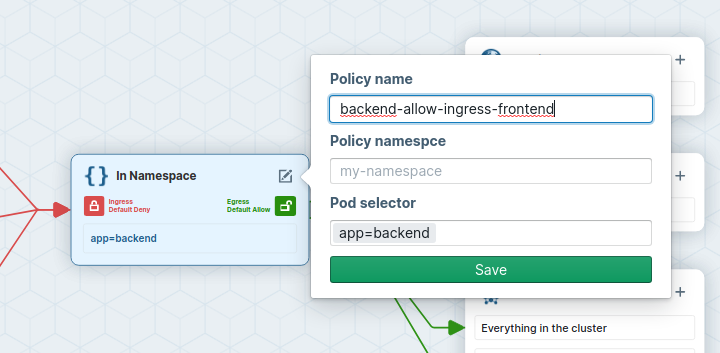
- Name the network policy to backend-allow-ingress-frontend (using the Edit button in the center).
- add app=backend as Pod Selector
- Set Ingress to default deny
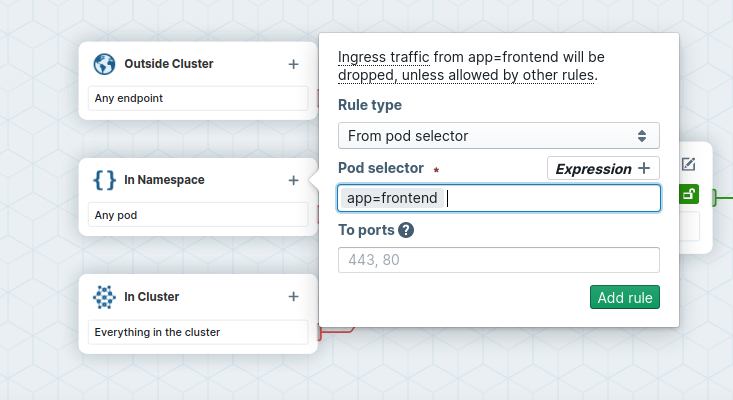
- On the ingress side, add
app=frontendas podSelector for pods in the same Namespace.
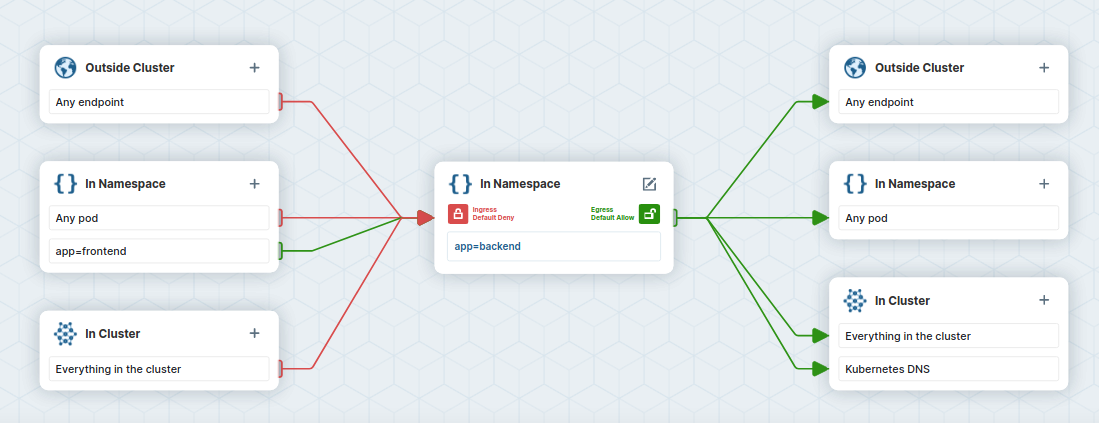
- Inspect the ingress flow colors: the policy will deny all ingress traffic to pods labeled
app=backend, except for traffic coming from pods labeledapp=frontend.
- Copy the policy YAML into a file named
backend-allow-ingress-frontend.yaml. Make sure to use theNetworkpolicyand not theCiliumNetworkPolicy.
The file should look like this:
---
apiVersion: networking.k8s.io/v1
kind: NetworkPolicy
metadata:
  name: "backend-allow-ingress-frontend"
spec:
  podSelector:
    matchLabels:
      app: backend
  policyTypes:
    - Ingress
  ingress:
    - from:
        - podSelector:
            matchLabels:
              app: frontend
Apply the new policy:
kubectl apply -f backend-allow-ingress-frontend.yaml
and then execute the connectivity test again:
kubectl exec -ti ${FRONTEND} -- curl -I --connect-timeout 5 backend:8080
and
kubectl exec -ti ${NOT_FRONTEND} -- curl -I --connect-timeout 5 backend:8080
This time, the frontend application is able to connect to the backend but the not-frontend application still cannot connect to the backend:
# Frontend
HTTP/1.1 200 OK
X-Powered-By: Express
Vary: Origin, Accept-Encoding
Access-Control-Allow-Credentials: true
Accept-Ranges: bytes
Cache-Control: public, max-age=0
Last-Modified: Sat, 26 Oct 1985 08:15:00 GMT
ETag: W/"83d-7438674ba0"
Content-Type: text/html; charset=UTF-8
Content-Length: 2109
Date: Tue, 23 Nov 2021 13:08:27 GMT
Connection: keep-alive

# Not Frontend
curl: (28) Connection timed out after 5001 milliseconds
command terminated with exit code 28
Note that this is working despite the fact we did not delete the previous backend-ingress-deny policy:
kubectl get netpol
NAME                             POD-SELECTOR   AGE
backend-allow-ingress-frontend   app=backend    2m7s
backend-ingress-deny             app=backend    12m
Network policies are additive. Just like with firewalls, it is thus a good idea to have default DENY policies and then add more specific ALLOW policies as needed.
We can verify our connection being blocked with Hubble.
Generate some traffic.
kubectl exec -ti ${NOT_FRONTEND} -- curl -I --connect-timeout 5 backend:8080
With hubble observe you can now check the packet being dropped as well as the reason why (Policy denied).
Note
Our earlier port-forward should still be running (can be checked by running jobs or ps aux | grep "port-forward svc/hubble-relay"). If it does not, Hubble status will fail and we have to run it again:
kubectl -n kube-system port-forward svc/hubble-relay 4245:80 &
hubble status
hubble observe --from-label app=not-frontend --to-label app=backend
And the output should look like this:
Jan 26 09:07:03.396: default/not-frontend-7db9747986-gktg6:45002 (ID:84671) <> default/backend-6f884b6495-69bbh:8080 (ID:68421) policy-verdict:none INGRESS DENIED (TCP Flags: SYN)
Jan 26 09:07:03.396: default/not-frontend-7db9747986-gktg6:45002 (ID:84671) <> default/backend-6f884b6495-69bbh:8080 (ID:68421) Policy denied DROPPED (TCP Flags: SYN)
Jan 26 09:07:04.401: default/not-frontend-7db9747986-gktg6:45002 (ID:84671) <> default/backend-6f884b6495-69bbh:8080 (ID:68421) policy-verdict:none INGRESS DENIED (TCP Flags: SYN)
Jan 26 09:07:04.401: default/not-frontend-7db9747986-gktg6:45002 (ID:84671) <> default/backend-6f884b6495-69bbh:8080 (ID:68421) Policy denied DROPPED (TCP Flags: SYN)
Jan 26 09:07:06.418: default/not-frontend-7db9747986-gktg6:45002 (ID:84671) <> default/backend-6f884b6495-69bbh:8080 (ID:68421) policy-verdict:none INGRESS DENIED (TCP Flags: SYN)
Jan 26 09:07:06.418: default/not-frontend-7db9747986-gktg6:45002 (ID:84671) <> default/backend-6f884b6495-69bbh:8080 (ID:68421) Policy denied DROPPED (TCP Flags: SYN)
Task 6.6: Inspecting the Cilium endpoints again
We can now check the Cilium endpoints again.
kubectl -n kube-system exec -it ds/cilium -- cilium endpoint list
And now we see that the pods with the label app=backend now have ingress policy enforcement enabled.
ENDPOINT   POLICY (ingress)   POLICY (egress)   IDENTITY   LABELS (source:key[=value])                                                        IPv6   IPv4         STATUS
           ENFORCEMENT        ENFORCEMENT
248        Enabled            Disabled          68421      k8s:app=backend                                                                           10.1.0.1     ready
                                                           k8s:io.cilium.k8s.namespace.labels.kubernetes.io/metadata.name=default
                                                           k8s:io.cilium.k8s.policy.cluster=cluster1
                                                           k8s:io.cilium.k8s.policy.serviceaccount=default
                                                           k8s:io.kubernetes.pod.namespace=default